Reviewing Apple Script Embroidery Font for Gifts
As an embroidery designer who spends countless hours digitizing and testing files, I approach every new machine embroidery design with a mix of curiosity and caution. When I recently downloaded the Apple Script Embroidery Font, my goal was simple: determine if it could hold its own in a busy personalized gift shop. I needed to know if this font was merely decorative or if it possessed the structural integrity required for real-world customer orders. After running several test stitches on various fabrics, I am ready to share my findings with fellow Etsy sellers, crafters, and small business owners looking to elevate their handmade product offerings.
First Impressions: Elegance Meets Playfulness
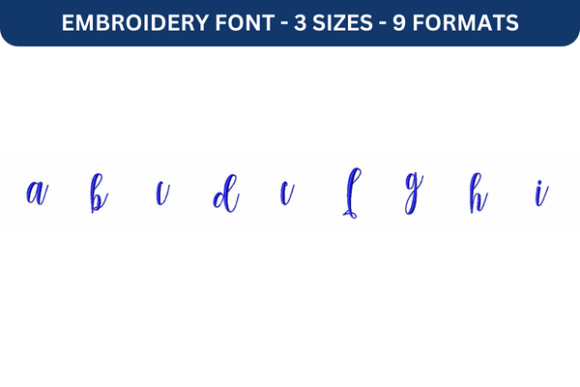
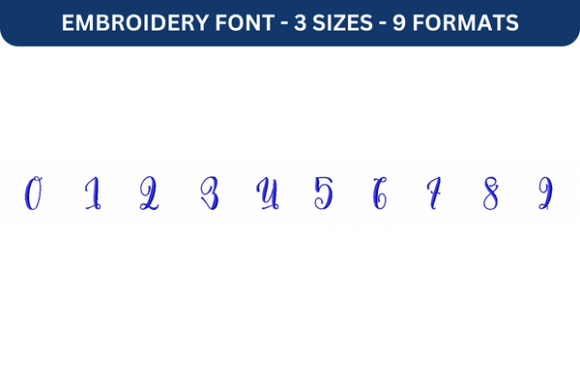
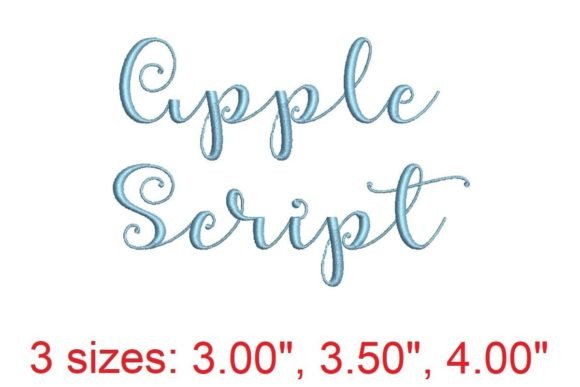
The moment I loaded the digital embroidery file into my software, the charm of the Apple Script Embroidery Font was evident. It strikes a delicate balance between romantic elegance and approachable warmth. The loops are generous without being overly tangled, and the curves flow naturally, mimicking the look of genuine handwriting. This is crucial for a personalized gift, where the emotional connection often hinges on how "human" the item feels.
Unlike rigid, block-style fonts that can feel industrial, this script feels intimate. It is sweet enough for a nursery yet sophisticated enough for a wedding keepsake. For designers focusing on the Back To School season, this font offers a softer alternative to traditional collegiate styles, perfect for labeling lunchboxes or backpacks with a touch of whimsy. The mood is distinctly handmade, inviting the viewer to appreciate the craftsmanship behind every stitch.
Versatility Across Product Lines
One of the strongest assets of the Apple Script Embroidery Font is its adaptability. During my review, I tested it across several popular categories to see where it shined brightest.
- Baby Embroidery: On soft muslin and cotton blends, the font looks adorable on burp cloths and receiving blankets. The rounded edges of the letters feel safe and gentle, appealing to parents seeking sentimental baby embroidery items.
- Wedding Gifts: When stitched in white thread on linen or ivory satin, the font exudes romance. It is ideal for monogramming handkerchiefs, robe hems, or guest book covers, serving as a timeless wedding gift that heirs might keep for generations.
- Kitchen and Home: I applied the design to an embroidered towel and a canvas tote bag. The legibility remained high, making it practical for naming kitchen linens or creating custom market bags. It adds a boutique feel to everyday items.
- Nursery Decor: On a felt pillow cover or a woven wall hanging, the script adds a storybook quality. It pairs beautifully with floral motifs or animal shapes, enhancing the overall aesthetic of nursery decor.
For small shop product lines, this versatility means you can use one font family across multiple categories, creating a cohesive brand identity. Whether you are selling blanket embroidery pieces or custom aprons, the consistent style helps customers recognize your work.
Navigating Technical Challenges
While the aesthetic appeal is high, any experienced embroiderer knows that beauty must be backed by technical reliability. There are specific scenarios where the Apple Script Embroidery Font requires careful handling. Because script fonts rely on connecting strokes, the stitch density and underlay are critical. If the density is too low, the fabric may show through the thin connections; if too high, the fabric may pucker.
I found that textured fabrics, such as thick terry cloth towels or heavy knits, can sometimes obscure the finer details of the loops. In these cases, using a cut-away stabilizer is non-negotiable to prevent distortion. Additionally, when working on stretchy baby clothes, I recommend hooping the garment with a strong stabilizer to ensure the letters do not warp after washing.
Another consideration is size. While the font is beautiful, shrinking it too much can cause the delicate tails of the letters to merge or break. Always check the minimum recommended size in the product description. If details are missing from the listing, advise readers to check them before use or run a test stitch on scrap fabric first. Dark fabrics also present a challenge; without sufficient contrast in thread colors, the intricate loops can get lost. I suggest using metallic or bright threads on dark backgrounds to maintain visibility.
Enhancing Perceived Value and Trust
From a business perspective, the choice of font directly impacts perceived value. The Apple Script Embroidery Font elevates a simple item into a luxury custom embroidery piece. Customers are often willing to pay more for items that look difficult to produce or uniquely designed. The elegant loops suggest a higher level of skill, which builds customer trust in your commercial embroidery services.
Furthermore, this font photographs exceptionally well. The shadows created by the raised stitches add depth to product images, making them more engaging on social media and Etsy listings. A well-stitched sample using this font can serve as a powerful printable mockup or digital preview, helping buyers visualize the finished product on their own items. This visual appeal drives buyer engagement and can significantly reduce hesitation in the purchasing process.
Practical Tips for Successful Stitching
To ensure the best results with the Apple Script Embroidery Font, I recommend following these practical steps before fulfilling customer orders:
- Test on Scrap Fabric: Always stitch a sample on the exact fabric type you plan to use for the final product. This helps you identify any tension issues or puckering.
- Check Thread Contrast: Ensure your thread color stands out against the fabric. High contrast improves legibility, especially for smaller text.
- Confirm Hoop Size: Verify that your machine’s hoop size can accommodate the full length of the names or phrases you intend to stitch. Script fonts often require wider hoops due to their horizontal flow.
- Review Stitch Density: Examine the back of your test stitch. If there is excessive buildup, adjust your tension or consider using a lighter weight thread.
- Use Proper Stabilizer: Match your stabilizer to the fabric weight. Cut-away for knits, tear-away for wovens, and wash-away for sheer fabrics.
- Compare Mockups: Create digital previews on both light and dark fabrics to see how the design translates. This helps in marketing the product effectively.
- Check Small Details: Inspect the entry and exit points of the stitches. Trim any jumps carefully to maintain a clean, professional look.
- Confirm Licensing: Before selling items made with this embroidery file, confirm the commercial licensing terms provided by the designer. Ensure you have the right to sell the finished product.
In conclusion, the Apple Script Embroidery Font is a valuable addition to any designer’s library. It offers the emotional resonance needed for meaningful gifts while maintaining the technical quality required for professional production. By understanding its strengths and respecting its limitations, you can create stunning personalized gift items that delight customers and strengthen your brand. Whether you are preparing for the Back To School rush or crafting bespoke wedding favors, this font delivers the charm and elegance that modern buyers crave.